Roles & Access
🔐 Control who can see which databoards using access controls and BI-specific permissions assigned through Settings → Roles.
📍 Accessing access controls
- Per databoard — Databoard list or editor → Access controls dialog.
- Roles — Configure in Settings (Core module); assign BI permissions to roles, then assign roles to users.
BI permissions
| Permission | Code | Effect |
|---|---|---|
| Manage Databoards Access Controls | ABI.DB.AC | Assign or remove users/roles on individual databoards |
| Unrestricted by Databoard Assignment | ABI.DB.UA | See all databoards regardless of per-board assignments |
Users without ABI.DB.UA only see databoards explicitly granted to them (or their roles).
⚙️ Per-databoard access controls
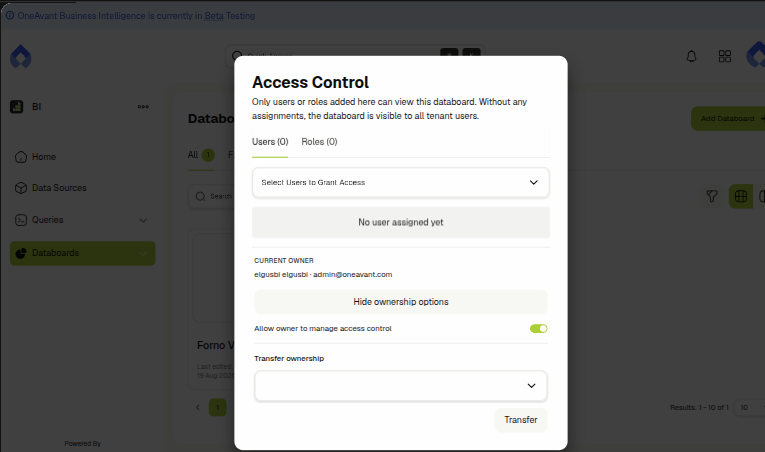
- Open a databoard → Access Controls (in the editor toolbar, or the lock/globe icon on a databoard card in the list).
- Search and add users or roles.
- Save — only listed users/roles (plus unrestricted admins) can open the databoard.
👤 Databoard ownership
Every databoard has an owner — the user who created it. The owner can manage that databoard's access controls (assign/unassign users and roles) even without the Manage Databoards Access Controls permission, as long as ownership hasn't been restricted (see below).
In the Access Controls dialog, click Manage ownership to see:
- Current owner — the owner's name and email.
- Allow owner to manage access control — a toggle visible only to users with Manage Databoards Access Controls. Turning it off strips the owner's ability to manage access on that one databoard, without affecting their other databoards; the owner cannot turn this back on for themselves — only an admin with the permission can.
- Transfer ownership — search for another user and click Transfer to make them the new owner. Available to the current owner (if their ACL rights haven't been restricted) or to anyone with Manage Databoards Access Controls. Transferring always restores Allow owner to manage access control for the new owner, regardless of what it was set to for the previous owner.
Databoard AI summary settings (see Maya AI Assistant) are gated by the same rule as access controls — only the owner (with ACL rights intact) or a user with Manage Databoards Access Controls can change them.
Access controls apply to the BI app. They also affect ERP dashboard embedding — users need both ERP access and databoard access to see embedded boards.
🚫 Scope notes
- Shared public links bypass login but only for the specific share token — not general databoard access.
- Integrations and queries are not yet split by fine-grained BI permissions beyond standard tenant auth; focus access control on databoards for sensitive dashboards.
- Module access: users need the avantbi module enabled on the tenant to open BI at all.
Related Docs
- Building databoards
- Sharing & delivery
- Maya AI assistant — AI summary settings share the same ownership/ACL gate
- User management — assign roles and permissions in Settings